
Business Calls should be measurable and accountable, Right?
Automate call tracking, enhance employee performance, and enrich CRM data, all in real-time with CallBlaze (Phone Bridge) by Picky Assist.
From Call Blind Spots to Complete Visibility
See what changes when your business calls become measurable, accountable and connected to your CRM.
- Without CallBlaze
- Sales calls happen outside the CRM
- Managers have to ask reps for call updates
- Missed calls can become lost leads
- Reps manually update call records
- Unknown callers may never enter the CRM
- Call activity is difficult to measure
- Follow-up depends on the salesperson remembering
- Agents copy phone numbers and switch between apps
- With CallBlaze
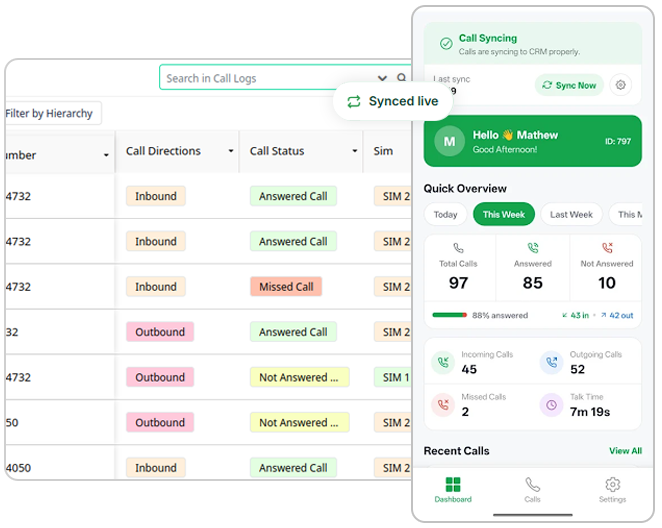
- Every business call is automatically logged in CRM
- Managers get visibility without chasing the team
- Missed & unanswered calls can trigger follow-ups
- CRM updates automatically after calls
- New callers can be automatically added as contacts
- Agent-wise call activity and duration are measurable
- Call outcomes can trigger tasks, WhatsApp, chatbots or CRM updates
- Agents can call leads directly from CRM
Run Your Business, Not Behind Calls!
You can’t sit next to every sales rep and listen to every call! Call Blaze lets you track every call, and check follow up on leads. Know what happened during a sales call without making a single one!
Zero Blind Spots
Every call made or received on a work phone is tracked automatically, with no extra hardware and no dependence on reps remembering to log anything.
No Lead Left Behind
Missed and unanswered calls automatically generate reminders and follow-up tasks, so leads get a second chance instead of going cold.
Built-In Accountability
You can see exactly who called whom, how long the call lasted, and what the outcome was, without having to ask their team for updates.
Performance at a Glance
Agent-wise call duration and peak calling times are tracked automatically, making it easy to spot who's performing and when the team is busiest.
Faster Responses
Real-time CRM notifications mean the team always has full context on a caller before picking up, improving how leads and customers are handled.
Self-Updating CRM
Instead of chasing reps to update records, the CRM fills itself in with accurate call data the moment a call ends.
One-Click Calling
Sales agents can call leads directly from the CRM, cutting out the extra step of switching to a dialer app.
Follow ups Made Easier
Every call outcome can trigger an action, a WhatsApp message, a chatbot, or a CRM update So next steps happen with a proper follow-up action.
Privacy is Protected
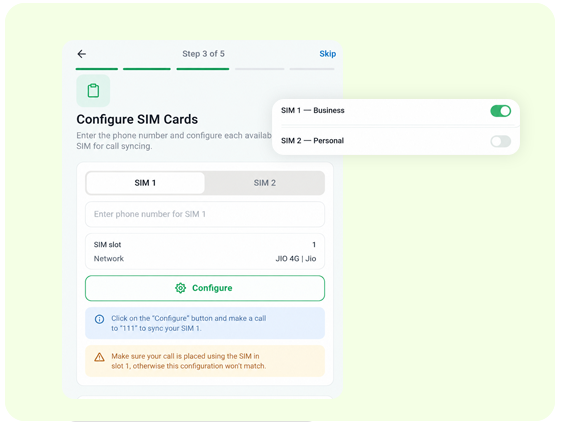
Separate personal and business SIMs while tracking, so employees keep their privacy while business-critical calls stay fully visible in the CRM.
Performance at a Glance
Agent-wise call duration and peak calling times are tracked automatically, making it easy to spot who's performing and when the team is busiest.
Everything call tracking needs to just work
From the moment a call connects to the moment a follow-up is logged, CallBlaze keeps your CRM current without anyone touching a keyboard.
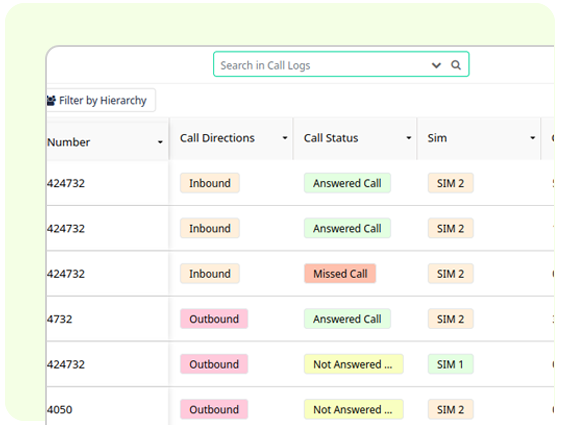
No Manual Call Entry to CRM
Every call is auto-logged into your CRM with duration, SIM used, call status, and direction; inbound or outbound. No manual entry needed, no missed records, just accurate data every time.
Never Miss a Lead – Auto Followup
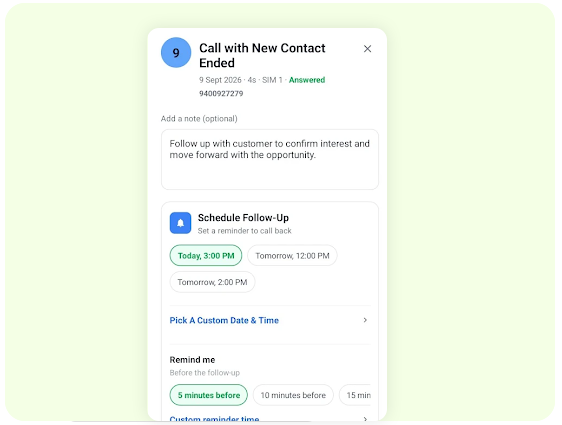
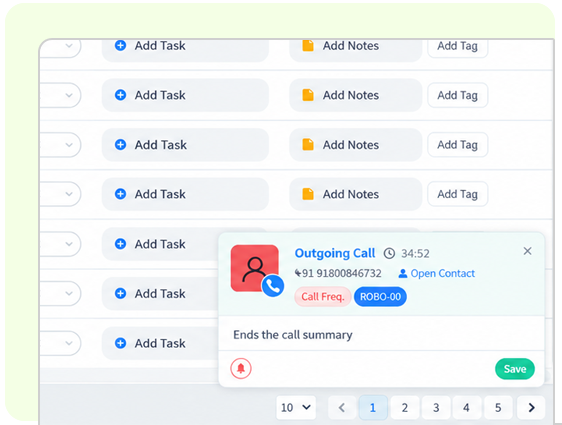
After every call ends, agents get an instant popup to log a quick call summary and set a follow-up task, right from their phone. Every follow-up lands automatically in your CRM as a task.
Track Call Duration & Performance
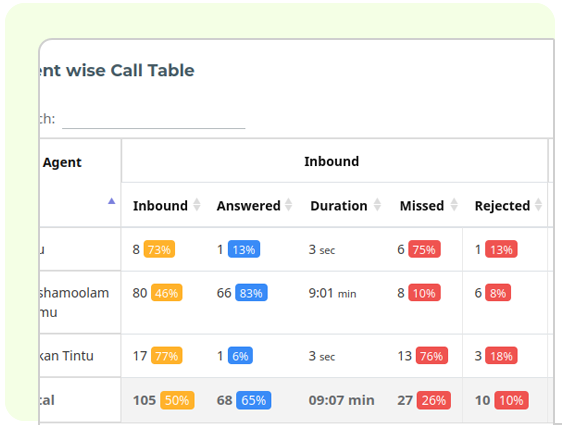
Track agent-wise call duration, in seconds, minutes, or hours. Spot performance trends and peak calling times to know how your team is performing.
Real-Time CRM Notifications
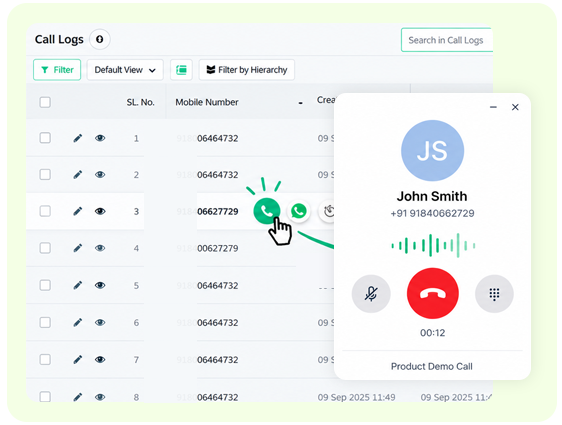
Get instant popups for every incoming and outgoing call, right down to when it’s answered, missed, or ends, so your team always has context before they respond.
Separate Work and Personal Calls
Choose exactly which SIM to track, one, both, or let each user decide. (Admin can only configure these global settings.) Business calls stay in your CRM; personal calls stay private.
Seamless Connectivity via Connector
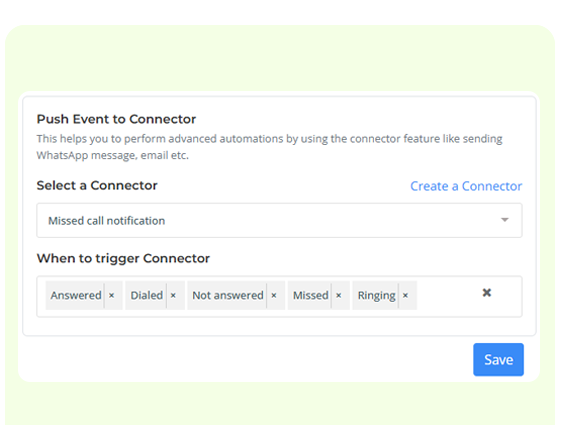
Trigger automated actions the moment a call is Answered, Missed, Not Answered, Dialed, or Ringing. Send a follow-up WhatsApp message, launch a chatbot, or update CRM fields instantly, all based on real call outcomes.
Auto-Add New Contacts
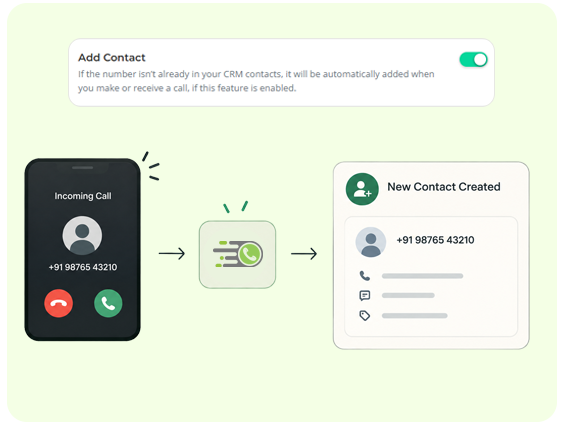
If a number isn’t already present as a CRM contact, it will be automatically added as a new contact in CRM when you make or receive a call. Turn on Add Contact once, and never lose track of a caller again!
Make Calls Directly from CRM
Make calls directly from the CRM once CallBlaze is set up. Sales agents can contact leads by simply clicking the call button next to a lead’s phone number in the CRM.
Get Call Blaze Running on Mobile in
3 Easy Steps
- Step 1
- Step 2
- Step 3
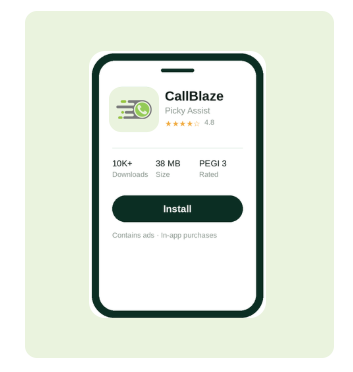
Install
Download Call Blaze Mobile app version from Google Playstore. Log in to the mobile app using your Workspace URL, Email ID and Password.
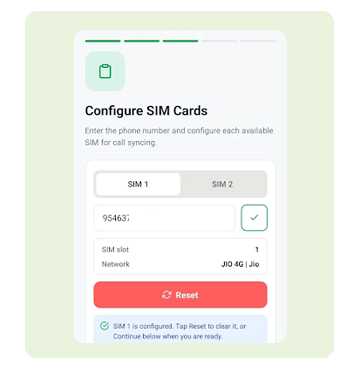
Configure Settings
Enter your phone number and configure settings for the available SIM for call tracking.
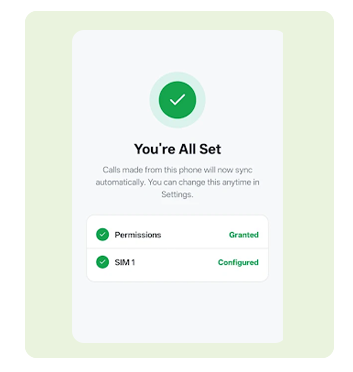
Call tracking in Action
See exactly how a call moves from your phone to your CRM; automatically logged, followed up, and ready for action, without a single manual entry.
Blaze & ease your business call tracking today with CallBlaze
Call Recording with AI Transcription
Automatically record calls and get an AI-generated transcript and summary attached directly to the CRM record. So you have a written account of the entire conversation and not just the fact that it happened.
Note: This feature is currently in its rollout phase. On Android, it requires installing a separate helper app and granting additional permissions to enable recording. Availability and reliability may vary by device and OS version.
Frequently asked questions
Will CallBlaze track the employees’ personal calls?
CallBlaze is designed with privacy in mind and tracks only the calls made from a designated business SIM card. If a business provides separate SIM cards for professional use, our software includes an option to exclusively enable tracking on the specific SIM slot used for business communications. This ensures that personal calls made on a separate, private SIM are not monitored, maintaining employee privacy and adhering to data protection standards.
Are calls made through CallBlaze recorded?
At this time, CallBlaze does not offer call recording functionality. Our service is optimized for tracking call details,and durations, and providing analytics to enhance performance management. Due to the diverse nature of Android devices and operating system versions, we have prioritized universal compatibility and robustness of the core features over call recording. However, we are continually improving CallBlaze, and the ability to record calls may be a feature we can offer in the future as we evolve our software to meet our users’ needs.
How much does CallBlaze cost?
CallBlaze is currently free and included with all plans on the V4 version. Customers still on V3 will need to upgrade and migrate to V4 to access all of CallBlaze’s functionality.
Is CallBlaze available for iPhone users?
No. As of now, CallBlaze is specialized for Android devices, taking advantage of the platform’s unique capabilities for call tracking. However, we understand the need for cross-platform compatibility and are working on introducing manual call tracking features for iPhone users through our upcoming iPhone app.
What exactly does CallBlaze do?
CallBlaze is a SIM-based call tracking software designed for Android devices. It automatically records all call details directly into your CRM, provides real-time caller ID information, and enables you to separate business and personal calls. It streamlines the process of call logging, follow-up task creation, and enhances your team’s productivity by offering detailed insights into call durations and employee performance.
How does CallBlaze improve employee performance?
CallBlaze offers analytics on call durations and outcomes, which helps managers identify top performers and areas where employees may need additional training. By measuring and analyzing these metrics, businesses can take steps to improve overall team efficiency and effectiveness in communication.
Can CallBlaze distinguish between personal and business calls?
Yes, one of CallBlaze’s features is SIM-wise call tracking, which allows you to separate and identify business calls from personal ones, ensuring that your CRM data remains accurate and professional.
Can CallBlaze automatically add new callers as CRM contacts?
Yes. When Add Contact is enabled, any inbound and outbound call from a number not already in your CRM is automatically added as a new contact, no manual entry required.
What call events can trigger automation?
CallBlaze can trigger a Connector based on five call events- Answered, Dialed, Missed Call, Not Answered, and Ringing. This lets you send automated follow-up messages, launch chatbots, or update CRM records the moment a specific call outcome occurs.
Does SIM-based call tracking of Call Blaze work on all devices?
SIM-based call tracking currently works only on Android devices, as iOS restricts the call log and SIM access permissions it relies on. This means agents need an Android device for calls to be auto-logged. Calls are logged against the CRM record automatically. No manual entry, no missed follow-ups.
How does CallBlaze improve employee performance?
CallBlaze offers analytics on call durations and outcomes, which helps managers identify top performers and areas where employees may need additional training. By measuring and analyzing these metrics, businesses can take steps to improve overall team efficiency and effectiveness in communication.
Does SIM-based call tracking of Call Blaze work on all devices?
SIM-based call tracking currently works only on Android devices, as iOS restricts the call log and SIM access permissions it relies on. This means agents need an Android device for calls to be auto-logged. Calls are logged against the CRM record automatically. No manual entry, no missed follow-ups.
Is CallBlaze compatible with any CRM?
CallBlaze integrates with Picky Assist Connector, facilitating a flexible and efficient call tracking process that fits seamlessly into your existing business infrastructure
What happens with missed or unanswered calls in CallBlaze?
CallBlaze automatically creates follow-up tasks and call summaries for missed or unanswered calls, ensuring that you never miss an opportunity to connect with a client or lead.
Do I need to purchase any additional hardware to use CallBlaze?
No, there’s no need for expensive hardware investments. CallBlaze works with your existing Android devices and SIM cards, reducing additional costs and simplifying setup.
What are the real-time notifications mentioned in CallBlaze's features?
Real-time notifications are alerts that pop up in your CRM whenever a call is made or received. They provide immediate, context-rich data about the call, allowing your team to respond swiftly and appropriately.
How does CallBlaze handle data privacy and security?
CallBlaze is designed with data privacy and security in mind. It ensures that personal employee data is kept separate from work-related data.
complying with the latest data protection regulations.
What kind of support can I expect with CallBlaze?
We offer comprehensive support for CallBlaze users, including installation assistance, troubleshooting, and regular updates. Our team is dedicated to ensuring your experience is smooth and beneficial.
Can employees make and receive calls from their computer/desktop using CallBlaze?
CallBlaze enhances the call management experience by providing desktop notifications for incoming calls, so employees are immediately informed of client interactions. For outgoing calls, employees can initiate the call process from their computer, which then prompts the Android phone to dial. The employee will need to physically click ‘dial’ on their phone to start the call. This feature ensures that the phone number is conveniently transferred to the phone’s dialer, streamlining the process of making calls without the need to manually enter phone numbers.
Can I see call performance stats for my team?
Yes. The Quick Stats dashboard shows agent-wise inbound, outbound, and missed call counts, along with call duration, viewable in seconds, minutes, or hours, so you can track team performance at a glance.